esp_sand_sim
Falling sand on a round 466×466 AMOLED about the size of a bottle cap. Tilt the board and the sand pours toward the low edge, touch the glass to paint, set the wood on fire.
- Display
- 466×466 round AMOLED, CO5300 driver over QSPI
- Touch
- CST9217, on a shared I²C bus
- Motion
- QMI8658 IMU, it supplies gravity
- Power
- AXP2101 PMIC, battery reporting and shutdown
- Materials
- Twelve, ordered by density
- Toolchain
- ESP-IDF v5.5.x, target esp32s3
I had the board sitting on my desk and wanted to see what it could do without a UI framework in the way. Falling sand is a good test for that, it touches the display driver, the touch controller, the IMU and the power management all at once, and you can tell from across the room when it's running badly.
The scene in the photo below is an hourglass. It came in as a PNG over USB, which is a feature I'll get to.
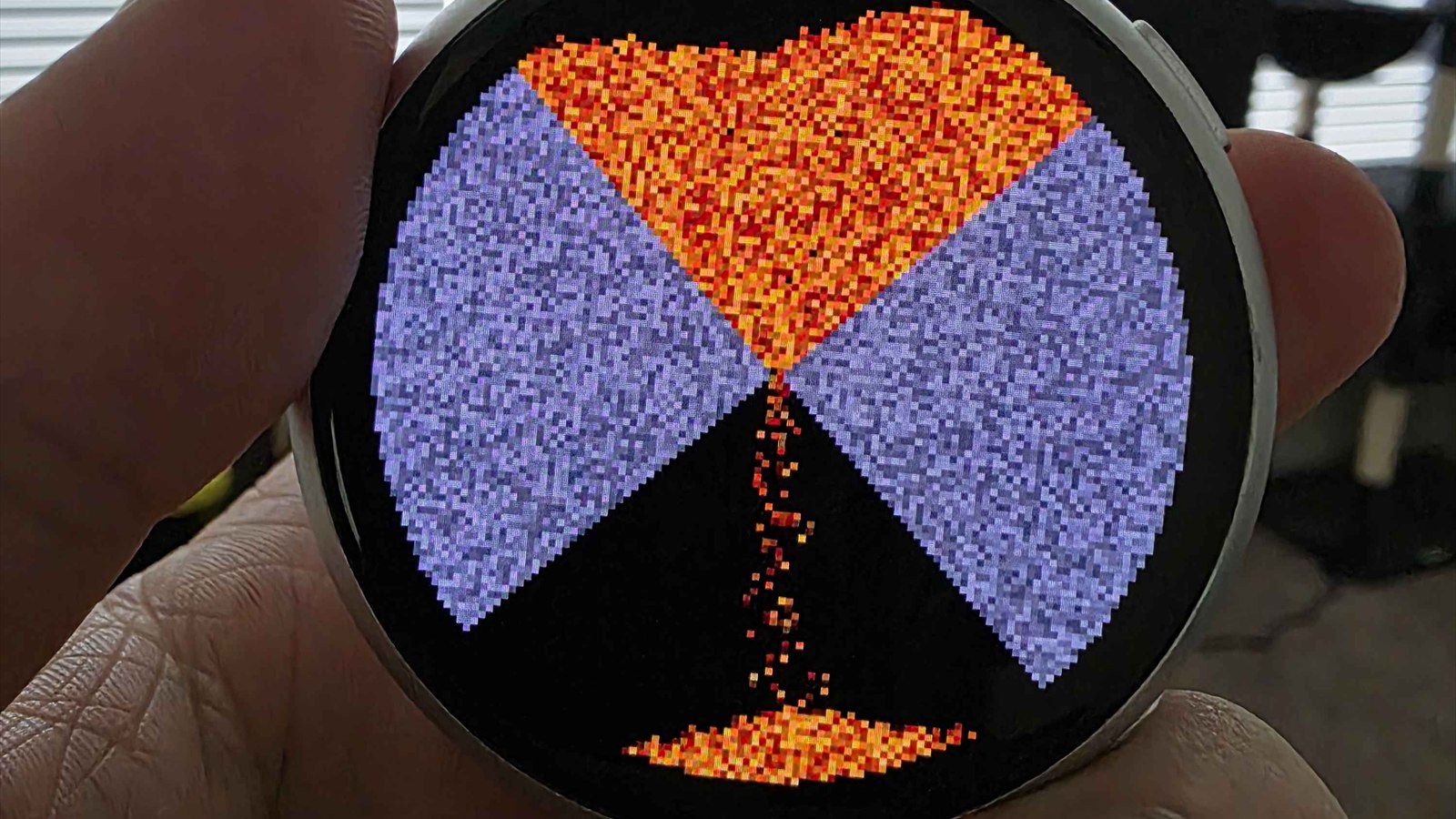
Twelve materials, ordered by density
There's no rules table and no behavior function per material. The materials are ordered by density, and that ordering is the simulation. A cell can move into any neighbour holding something strictly lighter than it is. Sand falls through water because sand is heavier, smoke climbs because everything around it isn't.
| Materials | Behavior |
|---|---|
| sand, dirt | Granular. Heaps hold a 45-degree angle of repose. |
| water, acid, lava | Liquids, spread until level. Acid dissolves sand, dirt, rock and wood. Lava sets wood alight and turns to rock in water. |
| fire | Burns wood, needs air, climbs against gravity, dies into smoke. |
| smoke, steam, acid gas | Rise and thin out. Steam condenses when it gets trapped. |
| wood, rock | Static, but wood burns, and both dissolve in acid. |
| wall | The bowl itself. |
No LVGL, and no framebuffer
The board ships with a BSP that wraps everything in LVGL. LVGL is fine and I'd use it for a normal UI, but this isn't widgets, it's a grid of colored cells going out as fast as the panel will take them.
There's no framebuffer in PSRAM either. You can allocate a 466×466 buffer out there and DMA it across every frame, and it works, it also spends most of the frame budget moving bytes over the octal bus for no reason. Instead the renderer paints one horizontal band at a time into a small buffer in internal DMA-capable RAM and pushes it straight out over QSPI.
So main/sand_board.c is 148 lines, panel bring-up, touch, the shared I²C bus, brightness. That's the whole hardware layer, and it's the thin slice the vendor BSP buries under a UI toolkit.
Only drawing what changed
The whole visible pipeline is dirty driven, at three separate layers.
The physics keeps per-row activity spans and proves settled cells immobile, so a cell that's come to rest costs nothing to skip. A cell counts as settled when all eight neighbours are at least as dense as it is, which holds no matter which way gravity is currently pointing. That matters here, because gravity is whatever the IMU last reported and nothing stops you turning the thing over.
The renderer trims every transfer to the rows and columns that actually changed. The menu code repaints only the wedges whose highlight changed instead of the whole ring, because redrawing a full screen overlay on every degree of thumb movement is what makes a menu feel cheap.
A stats line in the log prints physics and render cost every 200 frames, which is how any of this got tuned.
Menus shaped like the screen
Round screens punish rectangular UI. Lay something out as a list and it either wastes the corners you don't have or runs its text off the curve. So the menus are full screen pie rings, wedges running out to the edge of the glass, translucent over the paused scene, with a big target in the middle.
You drag to a wedge and lift to pick it. Lifting on the center of a ring with no center action cancels. One physical button drives all of it:
| Gesture | Action |
|---|---|
| touch / drag | Paint the selected material |
| Key1 click | Materials menu, tools live in the center |
| Key1 hold, 0.5s | System menu: save/load/import, settings, battery, power |
| Key1 click with a menu open | Close it |
| Key1 held ~1s at power-on | Redo the touch calibration |
Calibration that refuses to guess
Touch panels and display panels don't agree on which way is up, and the answer changes between boards. First boot runs a guided calibration, TAP THE DOT, twice, then solves for the orientation and stores it in NVS.
The part I'm happier with is what happens when it fails. A run that never converges on an orientation that fits stores nothing and falls back to the compile time guess in main/sand_config.h. Writing a bad calibration is worse than having none, because then the device is confidently wrong and the only way out is a factory erase.
Scenes, and a raw flash partition
Six scene slots live in a raw partition. Cells plus the color palette, one fixed size blob per slot, so a slot is just an offset. Slot one gets restored at boot.
Raw instead of a filesystem was deliberate. Nothing to mount, nothing to fsck, and nothing to corrupt halfway through a write because someone put the board down on the charger at the wrong moment.
# ESP-IDF Partition Table
nvs,      data, nvs,       0x9000,  0x6000,
phy_init, data, phy,       0xf000,  0x1000,
factory,  app,  factory,   0x10000, 8M,
scenes,   data, undefined, ,        512K,   # one blob per slot
storage,  data, fat,       ,        4M,     # the USB drive
The 4 MB FAT partition is the only thing a host ever sees. Pick USB from the settings ring and the board shows up as a drive. Drop in slot1.png through slot6.png and import them from the system menu.
Turning a PNG into sand
Images get fitted to the screen and each pixel becomes whichever material is nearest in color. Grain size comes from the image's own resolution, 233×233 down to 77×77, so an image drawn at exactly one of those sizes maps one pixel to one grain, and anything else gets scaled instead of turning to mush.
There are two import modes, and the image picks which one:
- Default, the scene is recolored and re-grained, as though it had been painted on by hand.
- Top-right pixel pure white, the scene keeps the image's own colors, through per-material palette overrides that get saved with the scene and travel with it.
Using a corner pixel as the flag is a hack and I like it. Nothing to strip out of the metadata, no sidecar file to lose, and no import dialog to build on a screen with no keyboard. The file carries its own mode.
The drive also gets a generated README.txt with the resolution table and the material color ramps, written out of the renderer's own palette data instead of maintained by hand, so it can't drift out of date.
idf.py build flash monitor